


Working from home is not just office work in softer clothes. It removes many of the cues that normally hold attention in place: a commute that creates a start line, coworkers who can see when you are busy, and a physical separation between work and everything else. At the same time, it adds more opportunities to switch tasks, and task switching carries a real cognitive cost. Research on multitasking and task switching consistently finds that switching can reduce speed or accuracy, and unfinished work can leave “attention residue” that makes the next task harder to enter. (pmc.ncbi.nlm.nih.gov)
That is why the usual advice to “just be more disciplined” rarely helps for long. Focus at home is usually a systems problem: unclear priorities, easy interruptions, a poorly set-up workspace, or an energy problem that gets mistaken for a motivation problem. The most useful fixes are concrete and a little boring. They reduce decisions, lower friction, and make it easier to stay on one thing long enough for concentration to deepen. Cue-based plans also tend to work better than vague intentions alone. (dccps.nci.nih.gov)
Use the Focus Friction Map before you change everything
Before trying all 15 strategies at once, identify the kind of breakdown that is happening most often. The Focus Friction Map is an original editorial diagnostic method for this article. It is not a clinical tool. It is simply a way to match the problem you notice with the fix most likely to help first.
| What you notice | Likely friction | Best strategies to try first |
|---|---|---|
| You spend the first hour organizing, re-reading messages, or deciding what matters. | Direction friction | 1, 2, 3 |
| You keep checking Slack, email, texts, tabs, or side tasks even when the main task is clear. | Switching friction | 4, 5, 6, 7, 8 |
| You feel physically restless, visually tired, or uncomfortable at the desk. | Environment friction | 9, 10, 11, 12 |
| Other people, household noise, or vague availability keep pulling you out of work. | Boundary friction | 5, 6, 14, 15 |
| You can start, but your focus collapses fast, especially after poor sleep or by late afternoon. | Energy friction | 12, 13, 15 |
Most people do not need a complete productivity overhaul. They need two or three changes that target the real bottleneck. If the real issue is constant interruptions, a prettier planner will not help much. If the real issue is chronic short sleep, a stricter schedule may still feel impossible because sleep quality and duration affect attention and memory. (doi.org)
Build structure before the day starts drifting

1. Use a short launch ritual, not a vague promise to focus
A good start ritual should take less than five minutes. Sit down, put the phone out of reach, open only the documents needed for the first task, and write one sentence describing what “started” means. For example: “Draft the opening section” or “Review pages 1 through 5.” The point is to convert intention into a cue and an action, because specific if-then style planning is more reliable than hoping motivation appears on time. (dccps.nci.nih.gov)
2. Choose a daily top three before opening everything else
Working from home often creates false urgency because every channel is visible at once. A daily top three counters that problem. Pick the three outcomes that would make the day feel substantively productive, not merely busy. If the list has nine items, it is not a top three. It is an anxiety inventory. Narrowing the field reduces the number of open loops competing for attention. (doi.org)
3. Match your focus block to the task, not to a universal timer
There is no magic interval that works for everyone. Use shorter blocks for resistant starts and longer blocks for concentration-heavy work. A 25- to 30-minute block can be enough to break inertia on a task you are avoiding. A 60- to 90-minute block is often better for analysis, writing, coding, or design work that has a long warm-up. The goal is continuity, not timer worship, because repeated switching creates re-entry costs. (pubmed.ncbi.nlm.nih.gov)
4. Batch communication instead of checking it continuously
Email and chat feel small because each check is small. Their combined effect is not. Set response windows that fit your job, such as once late morning, once after lunch, and once late afternoon. If the role truly requires faster replies, create one clearly defined channel for urgent issues instead of treating every notification as equally interruptive. The practical aim is to avoid constant switch costs and attention residue. (pmc.ncbi.nlm.nih.gov)
A hypothetical example: a remote project coordinator might reserve 9:00 to 10:30 a.m. for planning work, check inboxes at 10:30 and 1:30, and keep one emergency contact route for time-sensitive issues. That is usually more realistic than pretending messages do not exist or answering them every three minutes.
Reduce the cost of interruptions when the day gets messy
5. Write if-then plans for your most predictable distractions
Do not make rules for every possible problem. Make them for the distractions that happen three or four times a week. Examples: “If I think of a personal errand while working, I put it on a capture list instead of opening a shopping tab.” “If I finish a meeting early, I return to the current top-three item instead of checking social feeds.” These plans matter because they decide the behavior before the temptation arrives. (dccps.nci.nih.gov)
6. Make your phone physically inconvenient
The easiest distraction to resist is the one that takes an extra step. Put the phone behind you, across the room, or in another room during focus blocks. Turn off nonessential lock-screen previews. If that sounds excessive, try it for one morning before arguing with it. Working from home makes self-interruption especially easy, and self-initiated switching can be just as disruptive as outside interruptions. (pmc.ncbi.nlm.nih.gov)
7. Leave a re-entry note before you switch tasks
When you have to stop, do not merely stop. Leave a note with three things: where you paused, what the next visible action is, and what question still needs answering. This takes 30 seconds and saves a surprising amount of restart time later. It also reduces the mental drag of unfinished work, which is one reason attention residue builds after a switch. (doi.org)
8. Separate concentration-heavy work from admin work
Some remote workers make the day harder by mixing demanding work with tiny administrative actions in the same block. Writing, analysis, budgeting, strategic planning, and complex problem solving ask for continuity. Expense reports, calendar cleanup, status updates, and routine approvals usually do not. Group the shallow work so it stops nibbling at the edge of the deeper work. (pubmed.ncbi.nlm.nih.gov)
Make the workspace easier to work in
9. Create one default work zone, even if it is small
A separate room is helpful but not required. What matters more is consistency. One end of the table, one chair, one lamp, one shelf, one tray for current work. The default work zone should answer the question “Where does focused work happen here?” without negotiation every morning. Repetition turns the setup into a cue instead of a fresh decision. A consistent workstation also makes it easier to keep equipment and posture in a workable state. (osha.gov)
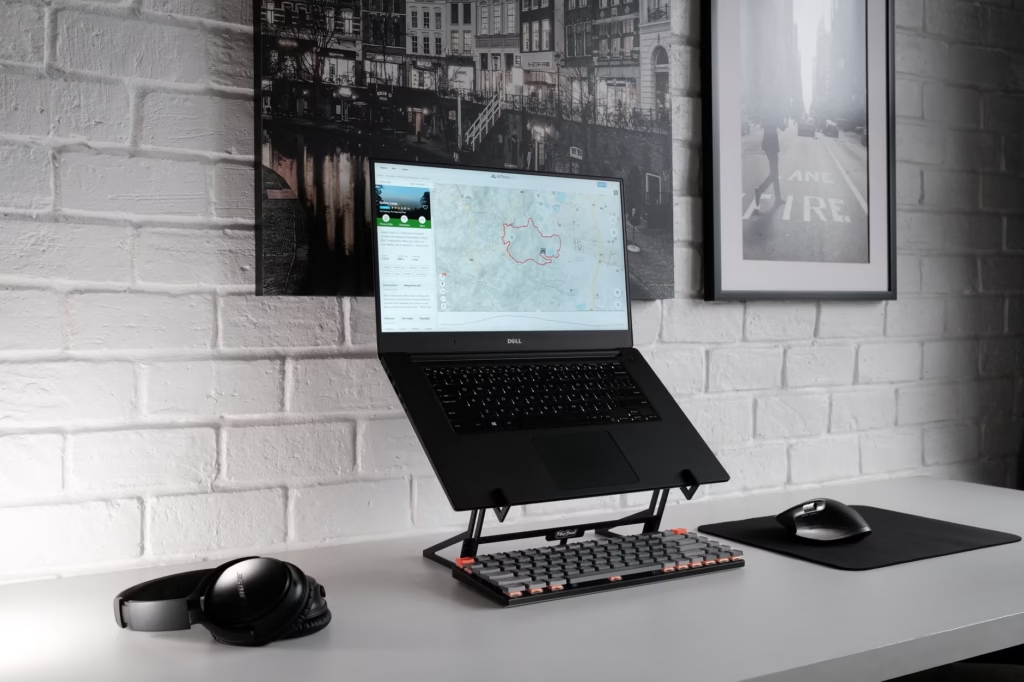
10. Fix laptop posture and screen height before buying more accessories
A lot of home-office discomfort comes from a simple problem: the screen is too low, the shoulders creep upward, and the neck stays angled forward for hours. OSHA recommends neutral body positioning, including relaxed shoulders, elbows close to the body, and feet supported by the floor or a footrest. If a laptop is your main machine, the best low-cost upgrade is often a stand or stacked books plus an external keyboard and mouse. (osha.gov)
11. Reduce glare, harsh contrast, and visible clutter
Visual friction is easy to underestimate because it feels like irritation rather than distraction. OSHA notes that glare and high contrast between the screen and surrounding area can contribute to eye fatigue and headaches. Reorient the desk so windows sit at a right angle to the screen when possible, use indirect or shaded light, and remove the pile of unrelated stuff that keeps catching your eye. The cleanest desk is not always necessary, but the most distracting desk is usually a tax on attention. (osha.gov)

12. Take microbreaks before discomfort becomes the schedule
Waiting until you feel completely fried is too late. OSHA advises that high-repetition tasks and long static postures may require several short rest breaks or microbreaks, with time to stand, stretch, and move around. For focus, these breaks work best when they are brief and intentional. Stand up, refill water, walk for two minutes, or do one quick household task that does not invite a 20-minute detour. (osha.gov)
Protect attention outside the task itself
13. Treat sleep as part of the work system
When focus is consistently weak, the problem is not always poor habits at the desk. The CDC notes that good sleep supports attention and memory, and that quality matters, not just total hours. If remote work has quietly extended the day into late-night catch-up, the next morning’s concentration may feel like a discipline issue when it is really an energy issue. Protecting a real stop time often helps more than adding another productivity app. (cdc.gov)
14. Make household availability explicit instead of hoping others infer it
Vague boundaries create frequent interruptions. Specific boundaries reduce negotiation. Tell the people you live with what is actually protected, what is flexible, and what counts as urgent. A closed door, a desk sign, or headphones can help, but the stronger move is a clear agreement: “From 9:30 to 11:00 I am in focus time unless it is time-sensitive.” Planned rules work better than improvising in the moment. (dccps.nci.nih.gov)
15. End with a five-minute shutdown that sets up tomorrow
One reason home working hours sprawl is that the day never feels definitively closed. A short shutdown ritual solves two problems at once: it reduces the temptation to keep mentally carrying unfinished work into the evening, and it makes the next morning easier to start. Review what moved, list tomorrow’s top three, leave re-entry notes on in-progress work, and physically clear the desk. That small reset reduces attention residue now and start-up friction later. (doi.org)
If focus has been poor lately, change these three things first
- For the next two workdays, begin with a two-minute launch ritual and a written top three.
- Put the phone out of reach and batch email or chat into scheduled windows for at least one morning block.
- End the day with a five-minute shutdown note so tomorrow starts with a visible first action instead of a foggy re-entry.
That short experiment is useful because it tests structure, interruption control, and restart quality without requiring a complete life overhaul. If focus improves, keep the changes that mattered and add workspace or sleep fixes next. If it does not improve, revisit the Focus Friction Map and look harder at boundary or energy issues. (cdc.gov)
These strategies help with ordinary work-from-home distraction. They are not a cure for chronic insomnia, an unrealistic workload, or a home situation that makes uninterrupted work impossible. If concentration problems are persistent, worsening, or tied to sleep problems, it is sensible to speak with a manager, a healthcare professional, or both. (cdc.gov)
The strongest focus systems at home are usually not dramatic. They are modest, repeatable, and a little mechanical. A clear first task, fewer switches, a workable desk, better boundaries, and a real stop time will do more for concentration than waiting to feel perfectly motivated. Start with the friction that shows up most often, fix that first, and let consistency do the rest.
FAQ
Is multitasking ever fine when working from home?
Sometimes, but mainly for low-stakes or passive combinations, not for demanding cognitive work. If both tasks need active attention, what usually happens is task switching, and switching has measurable costs in speed, accuracy, or mental effort. (pmc.ncbi.nlm.nih.gov)
Do I need a Pomodoro timer to stay focused?
No. Timers are tools, not solutions. If a timer helps you start, use one. If it interrupts good momentum every time concentration finally deepens, use longer blocks. The better rule is to protect continuity long enough that you are not constantly paying re-entry costs. (doi.org)
What if my job really does require fast responses?
Then the goal is not zero responsiveness. It is clearer responsiveness. Create tiers: one channel for urgent issues, one or two planned windows for routine communication, and protected blocks for work that cannot survive constant interruption. That is usually more realistic than trying to be instantly available everywhere.
Can these strategies work in a small apartment or shared space?
Yes, but the emphasis shifts. In a tight space, consistency and boundary signals matter more than perfect separation. A single chair, lamp, tray, pair of headphones, or folding screen can still create a recognizable work zone and reduce negotiation about availability. (osha.gov)
When should poor focus be treated as more than a routine problem?
If concentration problems stay severe even after you improve sleep, reduce interruptions, and simplify your work structure, or if they are getting worse, it is reasonable to ask whether the issue is bigger than routine. The CDC specifically advises talking with a healthcare provider if you have problems sleeping, and sleep is one common contributor to weak attention and memory. (cdc.gov)
References
- CDC – About Sleep – https://www.cdc.gov/sleep/about/index.html
- OSHA – Computer Workstations: Positions – https://www.osha.gov/etools/computer-workstations/positions
- OSHA – Computer Workstations: Workstation Environment – https://www.osha.gov/etools/computer-workstations/workstation-environment
- OSHA – Computer Workstations: Work Process and Recognition – https://www.osha.gov/etools/computer-workstations/work-process
- University of Konstanz – Implementation Intentions and Goal Achievement – https://www.socmot.uni-konstanz.de/publications/implementation-intentions-and-goal-achievement-meta-analysis-effects-and-processes
- Leroy (2009) – The Challenge of Attention Residue When Switching Between Work Tasks – https://doi.org/10.1016%2Fj.obhdp.2009.04.002
- PMC – Multicosts of Multitasking – https://pmc.ncbi.nlm.nih.gov/articles/PMC7075496/
- OSHA – Computer Workstations: Checklists, Evaluation – https://www.osha.gov/etools/computer-workstations/checklists/evaluation